 |
Graflex.org Get help with your Graflex questions here This forum is temporarily read-only. |
| Scanning 4x5 Negatives; DPI Preferences Goto page Previous 1, 2 | |
| Graflex.org Forum Index -> Film Help | |
| Author | Message | ||
|---|---|---|---|
| Leigh Joined: 05 Sep 2011 Posts: 6 |  Posted: Sun Oct 02, 2011 6:57 pm Posted: Sun Oct 02, 2011 6:57 pmI scan my 4x5 on an Epson V750 at either 2400 or 4800 dpi, depending on the desired quality. Obviously, the 2400 dpi files are one fourth the size of the 4800, and process much faster. If I only want an index image, to keep track of what's on the negative, I scan @ 300 dpi. - Leigh | ||
| bartbob Joined: 30 Oct 2010 Posts: 102 | Posted: Fri Oct 28, 2011 12:27 pm Finally got back from trips and have some results from my newly acquired Epson 3200 scanner. Below is a 3200 spi scan of a negative made from a Graflex 90mm WA Optar enlarged about 6x; it's a 3x5 inch section near the corner: 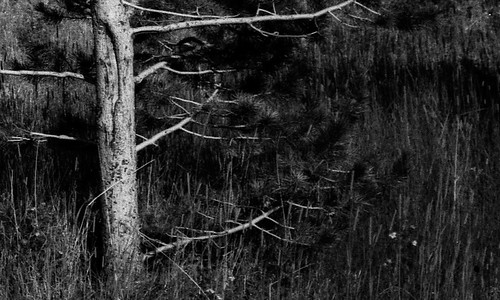 And the following is a 750 dpi scan of the negative made by the pro shop in town: 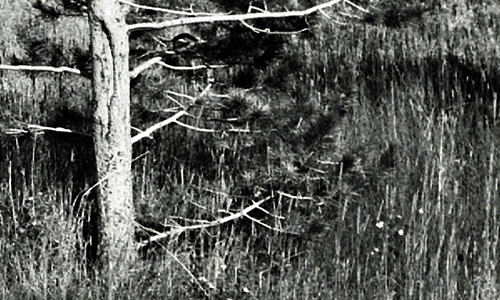 The glass is very clean, no plastic gassing residue observed with laser or bright LED flashlight. Good contrast in several test scans. A 20 x 30 inch print from my scan looks excellent. Very pleased with the results. Had to double the memory in my old XP based PC to speed up processing, but 'twas worth it to get excellent enlargements. | ||
| 45PSS Joined: 28 Sep 2001 Posts: 4081 | Posted: Fri Oct 28, 2011 6:12 pm The difference between a 1600 dpi scanner and a 3200 dpi scanner is the very fine to extremely fine detail clarity and overall Dmax. Gas out of the internal components will result in a slightly soft scan when you use to have a very sharp one. The LED's may cut through it better than the cold cathode fluorescent lamp did. Enjoy! | ||
| bartbob Joined: 30 Oct 2010 Posts: 102 | Posted: Sat Oct 29, 2011 2:24 am I'm still thinking about that old Graflex 90mm f/6.8 Optar used to take the picture. While it does shift focus a bit when stopped down, it's very sharp at the center and excellent at the corners. I may ask a repair shop to check the lens and see if it may have been reassembled wrong and is why it changes focus stopped down. | ||
| 45PSS Joined: 28 Sep 2001 Posts: 4081 | Posted: Sat Oct 29, 2011 5:47 am http://cameraeccentric.com/html/info/wollensak_14.html page 52 shows the lens diagram, page 53 states all exposures should be made at f11 or smaller. Using the diagram it should be easy to determine if the elements are in the correct order but I do not know about their spacing. | ||
| bartbob Joined: 30 Oct 2010 Posts: 102 | Posted: Sun Oct 30, 2011 5:36 pm Scanning tests with that Epson 3200 produced some interesting results. The negative remained in place while making scans at different resolutions. Some were resized down to half the resolution to see how that effeced overall image quality. Two scans of each type were made. Results are: Scanned at 2400, slightly fuzzy image. Scanned at 3200, barely sharper than the 2400. Scanned at 3200 then resized to 1600, noticably sharper than 3200. Scanned at 4800, same as 3200. Scanned at 4800 then resized to 2400, sharpest image. I know 3200 is the optical scan standard and both 2400 and 4800 are interpolations, but surprised that the 4800 to 2400 one was the sharpest. | ||
| 45PSS Joined: 28 Sep 2001 Posts: 4081 | Posted: Sun Oct 30, 2011 6:16 pm
Epson smart scan wants to include a Unsharp Mask filter as its default. Other settings have a tendency to revert to default when making a change to one of the scan parameters. Are you rechecking the other settings when changing the scan resolution? Are you scanning in grayscale or rgb? At what bit depth? What resampling in photoshop? Bicubic or bicubic sharper are best. | ||
| All times are GMT | Goto page Previous 1, 2 |
Read-only archive of a phpBB 2 board · Powered by phpBB © 2001, 2005 phpBB Group